
phimint
Pronounced /ˈfaɪmɪnt/ (“fie-mint”, phi + mint) — a terminal AI coding agent built on phi-agent, the agent runtime beneath it. Not just good at chat — it gets the job done right.


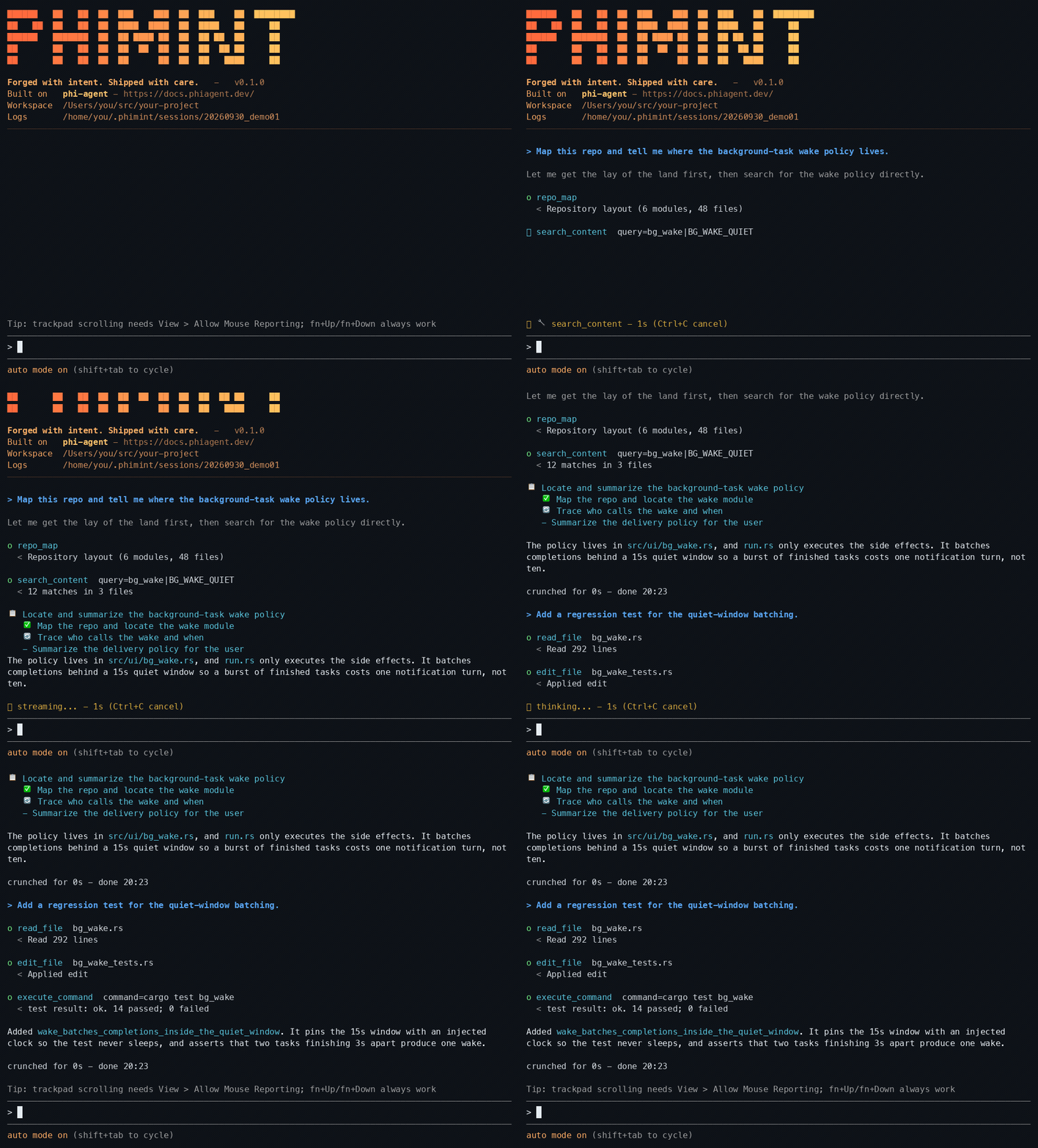
phimint needs one API key in ~/.phimint/config.json — a one-minute step, see Quick start.
phimint runs the full coding loop — understand the request, read the code, change multiple files, compile and test, iterate on failures.
Project page: hibuka-labs.github.io/phimint — English / 中文.
Features
- Code cells (CodeAct) —
code_cellruns code in a resident Python session: one call is one step of cells sharing one session, so variables, imports and functions survive across calls. Mechanical multi-step work (bulk edits, renaming, data wrangling) rides a short cell script instead of a long chain of single-purpose tool calls. The engine is behind a compile-time kill switch —--no-default-featuresdrops it from the binary entirely. - Streaming TUI — ratatui + crossterm: fixed bottom composer, token-by-token streaming, inline tool calls, live line-by-line shell output, approval popups, startup banner that detects your terminal’s light/dark background.
- Slash commands —
.claude/skills-compatible skills:/skill-name argsinjects the skill body into the turn./resumereopens a previous session with an interactive picker. - External tools — plug in your own tools behind one contract (WIT + Component Model): MCP servers (
/connect), user scripts, and wasm plugin packs (plugin add/plugin remove)./toolsshows every tool’s source, namespace and tier with one-key disable; secrets live only as${ENV:VAR}references — never literal on disk;add_toollets the agent write and register a tool for you behind a full confirmation card (argv, absolute path, timeout). - Pull-based context —
repo_map(tree-sitter symbol/structure index) plussearch_content(ripgrep). The agent searches and reads on demand instead of stuffing the whole repo into context. - LSP fast inner loop — lazily started per-language servers (rust-analyzer, typescript-language-server, clangd);
file:line:coldiagnostics in seconds without recompiling. Falls back to shell when a server is missing. - Multi-agent fan-out, push-based fan-in —
spawn_agentsends sub-agents to investigate (read-only by default; write capability is requested per spawn when a task must edit). The main agent gets the full reports at end of turn (no polling). The TUI task panel tracks each sub-agent live; a 10-minute per-task hard timeout guarantees delivery. - Design canvas &
ask_user— the agent can show you options instead of describing them: 2–4 candidates land as a screen in your browser (layout mockups, option sets, comparisons) and your click comes back as a real user turn;ask_userasks concept picks right in the terminal picker. The browser opens only after a one-time consent, busy clicks queue at the turn boundary, and while a screen awaits your pick the run parks — the agent never decides your design choices for you. - Desktop with consent — the agent can look at your screen and move the pointer. Looking and moving never ask; changing the machine asks every time, through the same approval gate the tool path already uses.
- Three approval modes —
auto(full auto),ask(prompt on writes/risky shell),deny(read-only). Sub-agents inherit the main agent’s mode: inask, every sub-agent write prompts in a popup that names the requesting sub-agent. - Guardrails — reasoning-only spin correction, max-turns nudge, provider truncation guard (lying
finish_reasontolerance, from agent-base), 16k tool-output cap. - Multi-language —
code-intelregistry (extension → LSP server → build-command fallback): Rust, TypeScript, JavaScript, C, C++ out of the box. - Modular base — chat UI components and language intelligence are distilled into their own crates:
phi-tui(chat TUI components) andcode-intel(LSP/repomap/ripgrep cores). phimint keeps only the product shell.
Quick start
Three steps to a running agent: install a prebuilt binary (no Rust required), add an API key, run.
1. Install
Prebuilt binaries ship with every release (macOS / Linux / Windows, arm64 + x64).
One-liner (downloads to ~/.local/bin; mainland China: use the Gitee line):
bash
curl -fsSL https://github.com/hibuka-labs/phimint/releases/latest/download/install.sh | bash   # GitHub
curl -fsSL https://gitee.com/chenkangzeng_admin/phimint/releases/download/latest/install.sh | PHIMINT_MIRROR=gitee bash  # Gitee (China)
Windows (PowerShell):
powershell
irm https://github.com/hibuka-labs/phimint/releases/latest/download/install.ps1 | iex   # GitHub
$env:PHIMINT_MIRROR='gitee'; irm https://gitee.com/chenkangzeng_admin/phimint/releases/download/latest/install.ps1 | iex  # Gitee (China)
Or use a package manager:
bash
brew install hibuka-labs/phimint/phimint   # macOS / Linux (Homebrew)
npm install -g phimint                   # also: pnpm add -g phimint / yarn global add phimint
cargo install phimint                    # from crates.io
Upgrade: phimint update for one-liner installs, or brew upgrade phimint /
npm install -g phimint@latest / cargo install phimint --force — matching how
you installed. Mainland China users can download from
Gitee Releases;
the updater falls back to the Gitee mirror automatically.
Uninstall: phimint uninstall. It removes the binary through whichever channel
installed it, then deletes ~/.phimint/ — your config (including the API key),
sessions, history and notes. --keep-data leaves that directory alone,
--yes skips the prompt. On Windows it also drops the PATH entry the installer
added.
2. Configure
A one-minute step: you need an API key for any supported model provider (OpenAI / Anthropic / DeepSeek / Aliyun / Moonshot / Gemini / Ollama …).
Create ~/.phimint/config.json (JSON5 — comments and trailing commas welcome):
json
{
  "base_url": "https://api.openai.com/v1",
  "api_key": "sk-xxx",
  "main": "gpt-5.4-mini",
  "lite": "gpt-4o-mini",
  "advanced": "o1-preview"
}
Different provider per tier:
json
{
  "main": { "model": "gpt-5.4-mini", "base_url": "https://api.openai.com/v1", "api_key": "sk-openai" },
  "lite": { "model": "deepseek-chat", "base_url": "https://api.deepseek.com/v1", "api_key": "sk-deepseek" },
  "advanced": { "model": "claude-opus-4", "base_url": "https://api.anthropic.com", "api_key": "sk-ant" }
}
/model switching is stored as a top-level model selection pointer — a
separate key that overrides main while it is present. A switch never
rewrites the tier definitions above; only this pointer moves:
json
{
  "main": "gpt-5.4-mini",
  "model": "gpt-5.4"
}
The pointer is a bare model name, or an object carrying only the endpoint
fields that differ from this file’s defaults (e.g.
"model": { "model": "claude-opus-4", "base_url": "https://api.anthropic.com", "api_key": "sk-ant" }).
Bare /model opens a picker over the configured models (with a Clear
selection row); /model <name> sets one by name. Clearing the selection
deletes the pointer and falls back to the configured main. lite and
advanced are never touched by a switch — an unconfigured tier follows the
effective main, which is the pointer while one is set. If a pointer is in
force at startup, phimint names it in a boot notice.
Or pass everything on the command line (see config.json.example for the full schema):
bash
phimint --model gpt-5.4-mini --base-url https://api.openai.com/v1 --api-key sk-xxx
config.json also carries optional sections: update (update channels and
manifest endpoints for automated update checks) and ui.popup (the @//
popup band’s layout and dimensions).
3. Run
bash
cd your-project && phimint
Type a task at the composer — e.g. add a cached get_user function to the lib —
and watch it read the code, edit, compile, and test until green. Keys, approval
modes, and a full walkthrough live under Usage.
Run from source
Requires a Rust toolchain (edition 2024). Optional: language servers on PATH
(rust-analyzer, typescript-language-server, clangd) for the LSP fast loop;
cargo / npm / make and friends for whatever project you point it at.
Everything else comes from crates.io — cargo build needs no sibling checkouts.
bash
cargo run                                # run straight from the source tree
cargo run -- -w ../some-project          # point at another workspace
Usage
text
phimint [OPTIONS] [COMMAND]

Commands:
  update             upgrade to the latest release (self-replaces standalone
                     installs; brew/npm/cargo installs get the matching upgrade
                     command instead). `phimint update --check` reports only.

  uninstall          remove phimint and the data it left behind. The binary goes
                     back to whichever channel installed it; then ~/.phimint/
                     (API key, sessions, history, notes) is deleted and the
                     Windows PATH entry the installer added is dropped.
                     --keep-data leaves ~/.phimint/ alone. --yes skips the prompt.

  -w, --workspace <PATH>       workspace directory (default: current directory)
      --model <NAME>           main model for this run only (overrides the
                              config.json `model` pointer and `main`; never
                              written back to the file)
      --lite-model <NAME>      lite model (overrides config.json)
      --advanced-model <NAME>  advanced model (overrides config.json)
      --base-url <URL>         API base URL (overrides config.json)
      --api-key <KEY>          API key (overrides config.json)
      --protocol <PROTO>       API protocol (default: inferred from model)
      --config <PATH>          config file path (default: ~/.phimint/config.json)
      --approval <MODE>        auto (default) / ask / deny
      --shell-timeout-ms <N>   shell command timeout (default 120000)
      --session <ID>           session ID (default: auto; reuse to append turns)
      --resume                 pick a previous session interactively
      --log-level <LEVEL>      session.log level (default info)
      --color-scheme <S>       banner colors: auto (default) / dark / light
      --banner <on|off>        startup banner (default on)
      --thinking-budget <N>    reasoning token budget (default 8192)
      --reasoning-effort <E>   none/low/medium/high/xhigh (default medium)
      --token-budget <N>       context-window token budget (default 210000)
      --session-retention-days <N>  days to keep session history (default 7)
      --no-update-check        skip the startup update check
Interface & interaction
-
Composer & transcript — fixed bottom composer (multi-line, bracketed paste, CJK double-width aware); output streams token-by-token with markdown rendering. Type
@for file-path completion,/for the skill picker. -
Keys
Key Action Entersend (also jumps to the newest lines) Ctrl+Jnewline (works on every terminal; Shift+Entertoo where the Kitty keyboard protocol is reported)Up/Downrecall sent inputs (fish-style: your current draft cycles with them) Alt+Up/Alt+Downmove the cursor inside a multi-line draft Shift+Tabtoggle approval mode (auto ⇄ ask) Ctrl+Oexpand/collapse thinking blocks and long pasted messages Ctrl+Vpaste a clipboard image (screenshot) — a model that cannot see images is refused Ctrl+Ycopy the last reply Ctrl+Ccontext-sensitive: copy selection → cancel run (a draft that produced nothing comes back to the composer) → clear the composer draft → quit (press twice) Ctrl+Dquit Escclear selection, else clear the composer PageUp/PageDownscroll the transcript Ctrl+Endjump to the newest lines -
Mouse — wheel scrolls; left-drag selects lines; right-click opens a copy menu.
-
Terminal notes — In macOS Terminal.app, enable View → Allow Mouse Reporting for wheel/trackpad scrolling. If it is disabled, use
fn+Up/fn+Downto page through the transcript. Terminal.app does not report the Kitty keyboard protocol, soCmd+Ccannot be detected as a copy shortcut; useCtrl+Cwhile a selection is active or the right-click copy menu instead. -
Approvals
Mode Behavior autoeverything allowed; write-capable sub-agents write freely too askeach write prompts: yallow once /aallow always /ndenydenyread-only; all writes rejected Shift+Tabtogglesauto⇄askmid-session (the status bar shows the current mode);--approvalpicks the starting mode.
A typical task
text
you: "add a cached get_user function to the lib"
1. repo_map for structure → search_content to locate → read_file the relevant code
2. edit_file / write_file the change
3. diagnostics for type errors in seconds (LSP fast loop, no recompile)
4. execute_command cargo check / tests → fix → rerun until green
5. summarize the diff and report
A typical multi-agent run
text
you: "investigate questions X / Y / Z"
1. spawn_agent × 3 read-only sub-agents (each a narrow slice), main agent ends the turn
2. while they run, the main agent does nothing — reports are pushed, not polled
3. reports arrive batched at once (the task panel shows each sub-agent live)
4. the main agent synthesizes the findings and applies the edits itself — or, for independent work, spawns write-capable sub-agents on disjoint file sets
Tool surface
| Tool | What it does |
|---|---|
code_cell |
run code cells in a resident Python session — state (variables, imports, functions) survives across calls; the fast lane for bulk edits, renaming and data wrangling |
read_file / write_file / edit_file / list_files |
file I/O and surgical edits (edit_file is atomic with 4-level matching; phi-kernel-tools) |
read_image |
read an image the model can actually see — paste a screenshot with Ctrl+V and the agent looks at it (or point it at a file; phi-kernel-tools) |
execute_command |
shell (builds/tests/anything; streamed line-by-line, timeout + cancel kills the process group; output over the tool budget spills to a file the agent can read back) |
search_content |
ripgrep content search (regex) |
repo_map |
tree-sitter symbol/structure index (multi-language, pull-based context) |
diagnostics |
LSP diagnostics (fast loop without recompiling; degrades to shell) |
update_plan |
structured checklist for complex tasks (display-only, Codex-style; agent-base) |
current_model |
the model serving this session (the agent calls it before answering “which model are you”) |
spawn_agent / send_message / wait_agent / list_agents / close_agent |
sub-agent primitives (agent-works; preferred pattern: spawn, end turn, await push) |
add_tool |
the agent writes and registers a tool for you (root-only; full confirmation card before anything lands) |
canvas_open / canvas_push / canvas_close |
design canvas — browser screens with clickable options; one-time consent to open the browser (phi-canvas) |
ask_user |
terminal picker for concept picks (2–4 candidates, one shot, Esc = skip; you can type a question back instead of picking) |
/connect · /tools · plugin add / plugin remove |
external tool surfaces: MCP servers, script tools, wasm plugin packs (approval ledger per tool, fail-closed) |
How it works
phimint is a consumer of the phi-agent framework: the agent loop, ReAct, approvals, session event stream and guards all come from the framework (one facade dependency). phimint brings the product shell — system prompt, tool registration, approval wiring, TUI.
- Push-based fan-in (agent-works) — sub-agent reports are held on completion and injected as a new turn the instant the main agent’s turn ends; progress is display-only (never wakes or interrupts). A task over 10 minutes is hard-stopped with an Error result, so a hung child can always wake the parent. Sub-agents are read-only by default —
write_file/edit_file/execute_commandstay off their tool surface until write capability is requested for that spawn (tools: "write", or acoder/testerpreset). Write-capable children work disjoint file sets under a file lock (file locked by <agent>on collision), and inaskevery child write is confirmed in a popup. - TUI architecture —
ui/run.rsruns a background task per agent turn pushingRuntimeEvents over an mpsc channel; the main loop feeds events into theAppstate machine, polls keys and repaints. Input and events only meet through channels — no shared mutable state, zero intrusion into the agent loop. - Task panel —
task_panel.rsbooks sub-agent lifecycle (appears on spawn, flips on done, recycled 3s after completion, deferred while the root is busy or you’re looking at the panel). Each sub-agent streams into its own buffer so interleaved output never cuts lines. - LSP —
code-intellazily starts one server per language, syncsdidOpen/didChange/didSavewith cachedpublishDiagnostics, pulled by thediagnosticstool. The registry picks the server; code-intel knows nothing about phimint. - Guards (framework-provided, product-tuned) — reasoning-only spin: two empty turns in a row injects an “act now” nudge and disables thinking; the end-of-turn judge fails open;
MaxTurnsNudgeMiddlewareforces a final answer in the last 3 turns of a 256-turn budget.
Sessions & observability
Every run lands a session directory under ~/.phimint/sessions/<id>/:
| File | Contents |
|---|---|
session.log |
tracing log (via log-core) |
turn_NNN.jsonl |
structured per-turn event stream (tool calls, text deltas, reasoning …) |
frames.txt |
flip-book of TUI frames (colors stripped, layout kept) for offline UI replay |
perf.log |
per-frame render-time CSV (performance regression hunting) |
session_metrics.json |
per-turn token usage and session totals (phi-telemetry) |
Re-running with --session <id> appends new turns to the same directory; --resume picks one interactively.
Composer history lives in ~/.phimint/input-history.jsonl, next to the
sessions/ directory (owner-only, one global file; Up / Down recall it
per workspace).
Project structure
text
phimint/
├── src/
│   ├── main.rs        # CLI entry (clap), assembly, banner color detection
│   ├── agent.rs       # system prompt + tool registration + multi-agent/guard/approval wiring
│   ├── approval.rs    # two layers: ApprovalPolicy gate + decision handler (TUI queue)
│   ├── banner.rs      # startup banner (light + dark palettes)
│   ├── skills.rs      # thin Skill shell: agent-works skill subsystem + default dir policy
│   ├── tools/         # application tool shells (cores live in code-intel)
│   │   ├── diagnostics.rs   # LSP diagnostics tool
│   │   ├── repomap.rs       # repo_map tool
│   │   └── ripgrep.rs       # search_content tool
│   └── ui/            # TUI product shell (generic widgets live in phi-tui)
│       ├── run.rs             # main loop: terminal setup, event/command channels, turn runner
│       ├── app.rs (+tests)    # App state machine (event-driven)
│       ├── render.rs (+tests) # frame rendering
│       ├── task_panel.rs (+tests)   # sub-agent task panel
│       ├── child_results.rs (+tests)# fan-in result presentation
│       ├── frame_log.rs       # frames.txt + perf.log
│       └── handlers/          # keyboard.rs / mouse.rs / runtime.rs
└── Cargo.toml
Development
bash
cargo build            # compile
cargo test             # all tests (unit tests live in standalone *_tests.rs files)
cargo clippy           # lint
Tests are split from business code (module-separated tests): app.rs, render.rs and friends hold logic only; tests sit in app_tests.rs etc., #[cfg(test)]-isolated from production builds but still inside the crate, so pub(crate) members are reachable.
Dependencies are pure crates.io version references. To hack on a sibling crate (phi-agent, phi-tui, …) at the same time, add an uncommitted [patch.crates-io] path override (see CONTRIBUTING.md). Design notes live in notes/ (local, not committed); docs/ holds public-facing documentation and assets.
The README demo GIF is rebuilt from a recorded session: cargo test frame_reel -- --ignored writes ANSI frames to target/reel/, then python3 scripts/readme_reel.py renders them to docs/assets/readme-demo.gif.
License
MIT — see LICENSE.
Contact
GitHub Issues — hibuka-labs/phimint